
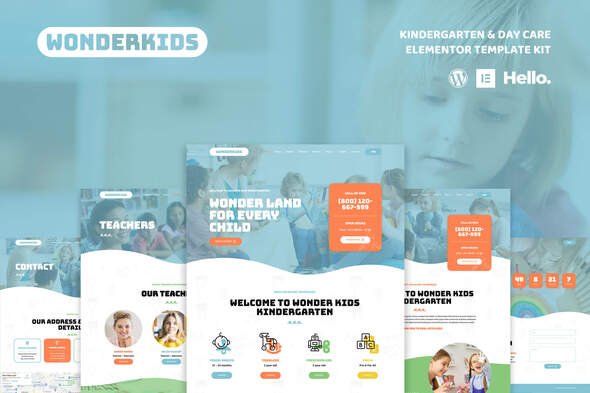
Wonderkids – Kindergarten & Children Day Care Elementor Template Kit
- Updated on April 28, 2026
- 100% Original Product & Well Documented
- Unlimited Domain Usage
*Important Note:
The image should not be Part of the template kit. You need to use your own reliable Source.


- Coupon "b2g1" has expired.
- Coupon "b2g1" has expired.
- Coupon "b2g1" has expired.
- Coupon "b2g1" has expired.
- Coupon "b2g1" has expired.
Original price was: ₹999.00.₹299.00Current price is: ₹299.00.
Launch your preschool or daycare website in one afternoon — no coding, no developers. 15+ pages, commercial license, lifetime updates. Go from download to live in hours, not weeks.
- Secured & Scanned by Virus total & McAfee.
- Access to Free updates for Lifetime
- All products are Under GPL License (Unlimited Domain Usage)
- We Not Provide any Support For this Product

Lifetime Membership
Access 6700+ Premium WordPress Themes & Plugins, Elementor Templates, Mobile Apps, PHP scripts with Lifetime Updates.
Join Premium MembershipRecently Viewed
Kindergarten & Children Day Care Website Template Kit for Elementor
Parents searching for childcare don’t just want to find you online — they want to feel something the moment they land on your site. Wonderkids gives your daycare or kindergarten a professional, warm presence that builds trust before they even read a word. It’s a ready-made Elementor Template Kit built for children’s education businesses: preschools, nurseries, tutoring centers, after-school programs. No coding knowledge needed. No agency required.
What You Get with Wonderkids
Everything arrives pre-designed and ready to customize. The hard part — the layout decisions, the color choices, the spacing that makes sites feel polished — is already done. You just plug in your photos, your programs, your team.
- 15+ pre-built pages: Home, About, Programs, Gallery, Teachers, Admissions, Contact, and more
- Mobile-responsive layouts that look sharp on any device parents are using
- Drag-and-drop editing through the free Elementor builder
- Commercial license — use it for paying clients or your own business, no restrictions
- Single payment, lifetime access — no subscriptions eating into your budget
Key Features That Set Wonderkids Apart
The homepage comes loaded with sections that do the heavy lifting: program highlights, facility showcases, staff introductions, and parent testimonials arranged in an eye-catching grid. The Admissions page isn’t just a form — it’s designed to guide parents toward enrollment with clear pricing tables and a prominent call-to-action. The Gallery uses masonry layouts to display classroom photos, activities, and events in a way that feels alive, not static.
- One-click demo import — your basic site structure is live in under 10 minutes
- Free updates forever — new sections and features added over time
- Direct access to our support team when you get stuck
- Works with Hello Elementor, Astra, and most standard WordPress themes
Who Is Wonderkids Built For?
Freelancers building childcare sites for clients who need results this week, not next month. New preschool owners launching on a budget using free WordPress hosting. Developers who want clean, organized styling they can extend without reverse-engineering spaghetti code. Anyone who needs a professional children’s education website without the professional price tag.
How to Get Started
Install Elementor on your WordPress site, upload the kit through the Elementor importer, and start replacing the placeholder content with your own. Every text block, heading, and color lives inside the builder — no diving into CSS files. Change your brand colors, drop in your logo, update your program descriptions. If you’ve dragged an element on a screen before, you already know how to use this.
Why Buy Wonderkids?
Custom childcare website design easily runs $2,000-$8,000. Even the budget end of that spectrum buys you weeks of back-and-forth before launch. Wonderkids gives you a finished result for a fraction of that — and you own it completely. The commercial license means you can repurpose it for client work too, effectively making your purchase pay for itself on the first project.
Your website should be live this month, not in three months. Download Wonderkids and get there.
Only logged in customers who have purchased this product may leave a review.
How to use Kit:
Install and activate the “Template Kit – Import” plugin from Plugins > Add New in WordPress.
Do not unzip.
Go to Template Kit – Import > Upload Template Kit Zip File button.
Before importing a template, ensure the Install Requirements button is clicked to activate required plugins.
For best results, do not import more than one template at a time.
RELATED PRODUCTS

DIVI – Original License | One Time Payment – Exclusive Deal

Elementor Pro 4.2.1 + Elementorism Landing Pages WordPress Plugin

907 5.3.6 – Responsive Multi-Purpose WordPress Theme

Element Pack Pro 9.1.0 – Addon For Elementor






 Mobile Apps
 php script
 How to

Reviews
There are no reviews yet