
Woodsie – Carpenter & Craftsman Elementor Template Kit
- Updated on April 29, 2026
- 100% Original Product & Well Documented
- Unlimited Domain Usage
*Important Note:
The image should not be Part of the template kit. You need to use your own reliable Source.


- Coupon "b2g1" has expired.
- Coupon "b2g1" has expired.
- Coupon "b2g1" has expired.
- Coupon "b2g1" has expired.
- Coupon "b2g1" has expired.
Original price was: ₹999.00.₹299.00Current price is: ₹299.00.
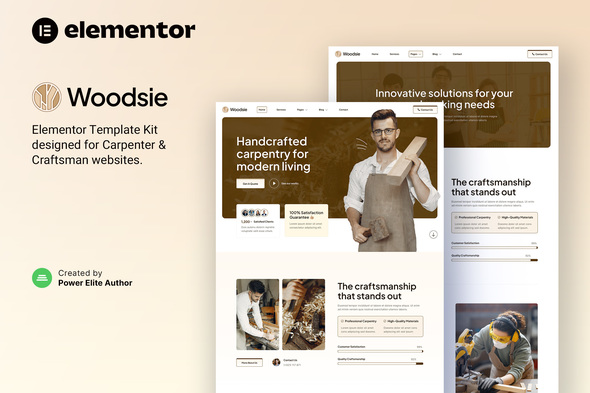
Clients are passing you over for woodworkers with flashier websites. Woodsie flips that — a no-code Elementor template built for carpenters and craftsmen. Pick your photos, drop in your info, go live today.
- Secured & Scanned by Virus total & McAfee.
- Access to Free updates for Lifetime
- All products are Under GPL License (Unlimited Domain Usage)
- We Not Provide any Support For this Product

Lifetime Membership
Access 6700+ Premium WordPress Themes & Plugins, Elementor Templates, Mobile Apps, PHP scripts with Lifetime Updates.
Join Premium MembershipRecently Viewed
Woodsie Elementor Template Kit for Carpenter & Craftsman Services
Your work speaks for itself. Your website should too. Most woodworkers either waste thousands on cookie-cutter templates or give up entirely on getting found online. Woodsie fixes that. It’s a purpose-built template that makes your portfolio look like a million bucks — without touching code or hiring anyone.
What Is Woodsie?
Woodsie is a WordPress template designed specifically for carpenters, cabinet makers, and independent craftspeople. It works with Elementor — the page builder WordPress pros use — and comes with everything ready to roll. Hero section, portfolio pages, contact forms, service listings. Install it, swap in your photos, add your phone number, and you’re live. Most people finish setup in under an hour.
What’s Inside the Kit
Not a fancy mockup you’ll spend weeks customizing. A real, working website you can launch today:
- Homepage with space for your best project photos and a clear call-to-action
- Portfolio pages built to showcase before/after shots and finished work
- Service listing templates for custom furniture, cabinetry, repairs, trim, and more
- Lead capture forms that actually get filled out
- Layouts that look sharp on phones — because that’s where your customers are browsing
- Color and font options you can tweak in minutes, not hours
Who Is This For?
One-person shops. Small crews. Carpenters who are tired of losing jobs to competitors just because those competitors have a better-looking website. If you build things with your hands and want a web presence that matches your skill level — this was made for you.
Getting Set Up
Three steps. Seriously. One: install WordPress and the free Elementor plugin. Two: upload the Woodsie file and let the import tool do its thing. Three: swap in your images, your business name, your contact info. Hit publish. Done. You’ll spend more time picking a lunch spot than setting up this website.
Why Woodsie Over a Cheap Template?
Those $15 generic templates? They’re not built for tradespeople. They don’t have spaces for project galleries, they look like every other site, and they make potential clients wonder if you actually know what you’re doing. Woodsie was built by someone who understands the trade. The layout, the sections, the flow — it’s all designed to show off craftsmanship and get people to call you.
One Price, Lifetime Access
No subscriptions. No yearly fees. Pay once, download immediately, and use it on unlimited projects. Lifetime updates included. Commercial license too — if you ever build sites for other tradespeople.
Your Next Client Is Searching Right Now
Make sure they find you first. Download Woodsie, spend an hour setting it up tonight, and wake up tomorrow with a website that actually represents the quality of your work.
Only logged in customers who have purchased this product may leave a review.
How to use Kit:
Install and activate the “Template Kit – Import” plugin from Plugins > Add New in WordPress.
Do not unzip.
Go to Template Kit – Import > Upload Template Kit Zip File button.
Before importing a template, ensure the Install Requirements button is clicked to activate required plugins.
For best results, do not import more than one template at a time.
RELATED PRODUCTS

DIVI – Original License | One Time Payment – Exclusive Deal

Elementor Pro 4.2.1 + Elementorism Landing Pages WordPress Plugin

907 5.3.6 – Responsive Multi-Purpose WordPress Theme

Element Pack Pro 9.1.0 – Addon For Elementor






 Mobile Apps
 php script
 How to

Reviews
There are no reviews yet