
Wooshwiz – Logistic & Shipping Elementor Template Kits
- Updated on April 30, 2026
- 100% Original Product & Well Documented
- Unlimited Domain Usage
*Important Note:
The image should not be Part of the template kit. You need to use your own reliable Source.


Original price was: ₹999.00.₹299.00Current price is: ₹299.00.
Skip the $5,000 web developer. Get a logistics website live today using this Elementor Template Kit — six pages, drag-and-drop setup, commercial license included.
- Secured & Scanned by Virus total & McAfee.
- Access to Free updates for Lifetime
- All products are Under GPL License (Unlimited Domain Usage)
- We Not Provide any Support For this Product

Lifetime Membership
Access 6700+ Premium WordPress Themes & Plugins, Elementor Templates, Mobile Apps, PHP scripts with Lifetime Updates.
Join Premium MembershipRecently Viewed
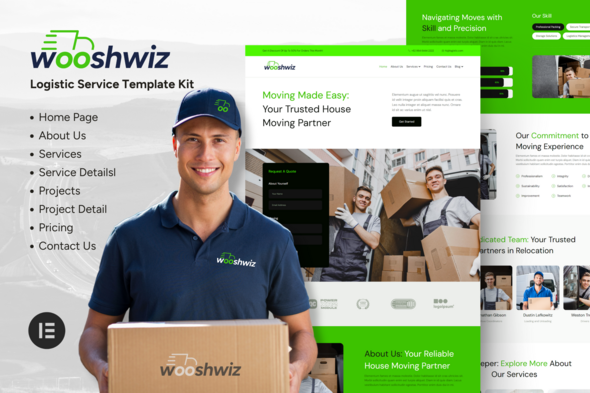
Wooshwiz Elementor Template Kit for Logistics & Shipping Websites
Here’s the reality: most logistics companies spend $4,000–$8,000 on a website that takes two months to finish. Then they wait another month for revisions. The Wooshwiz Template Kit flips that script entirely. You get a polished, professional logistics website — no coding, no developer back-and-forth, no waiting. Download it now and have something live tonight.
What’s Inside This Template Kit
Built for WordPress + the free Elementor page builder. If you’ve ever used Canva, you can handle this. Six pre-designed pages ready to customize:
- Homepage — hero, services overview, and a clear next step for visitors
- About Us — builds credibility before the first call
- Services — showcases freight, shipping, and moving options cleanly
- Tracking page — clients check their own shipments (less emails for you)
- Contact page — form + your info, nothing extra
- Quote Request page — turns browsers into leads
The design says “we know what we’re doing” without trying too hard. Clean lines, purposeful whitespace, and a color scheme that reads as trustworthy — exactly what shipping clients need to see.
Built to Convert, Not Just Look Pretty
Bold design means nothing if visitors leave without acting. Every section pushes toward a goal: request a quote, track a shipment, or pick up the phone. No distractions, no dead ends.
Responsive across all devices. Tablet, phone, desktop — your site looks sharp everywhere. Your clients check prices on their phones during deliveries. Your site should work there.
Who Is This For?
- New logistics companies that need a site yesterday
- Shipping businesses stuck with outdated websites
- Moving companies that want to look professional without the agency price
- Freight forwarders and independent transport operators
- Anyone who’d rather build a site in an afternoon than wait eight weeks
Getting Started Takes Minutes
After purchase, you get a download link immediately. Install the free Elementor plugin on your WordPress site, import the template kit, swap in your own text and images, and publish. Most people finish in a few hours. No technical knowledge required. No developer tickets to file.
Custom Development Is a Gamble You Don’t Have to Take
A custom logistics site averages $3,000–$8,000. Plus revision rounds. Plus waiting. This kit gives you the same professional result without the risk. Here’s what’s included:
- Commercial license — use it for your own site or client projects, unlimited
- Instant download — start the same minute you buy
- Free lifetime updates — no subscriptions, no surprises
- Works on most WordPress hosts
- Built on Elementor — if you ever need help, there’s a massive community and tutorials
Your Logistics Website Is Closer Than You Think
Stop handing over thousands to agencies for something you could build yourself. The Wooshwiz Template Kit gets you a professional logistics or shipping website — fast. Six pages, commercial license, instant access. Start building today.
Only logged in customers who have purchased this product may leave a review.
How to use Kit:
Install and activate the “Template Kit – Import” plugin from Plugins > Add New in WordPress.
Do not unzip.
Go to Template Kit – Import > Upload Template Kit Zip File button.
Before importing a template, ensure the Install Requirements button is clicked to activate required plugins.
For best results, do not import more than one template at a time.
RELATED PRODUCTS

DIVI – Original License | One Time Payment – Exclusive Deal

Elementor Pro 4.2.1 + Elementorism Landing Pages WordPress Plugin

907 5.3.6 – Responsive Multi-Purpose WordPress Theme

Element Pack Pro 9.1.0 – Addon For Elementor






 Mobile Apps
 php script
 How to
Reviews
There are no reviews yet