
WP Media Folder 6.0.5 – Media Manager with Folders
- Updated on May 5, 2026
- 100% Original Product & Well Documented
- Unlimited Domain Usage


- Coupon "b2g1" has expired.
- Coupon "b2g1" has expired.
- Coupon "b2g1" has expired.
- Coupon "b2g1" has expired.
- Coupon "b2g1" has expired.
Original price was: ₹4,300.00.₹299.00Current price is: ₹299.00.
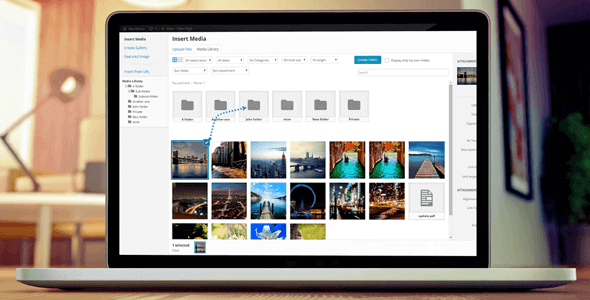
That moment when you remember that image was uploaded three months ago but can’t find it anywhere. WP Media Folder fixes the chaos — create folders, drag files, search instantly. Your media library finally makes sense.
- Secured & Scanned by Virus total & McAfee.
- Lifetime Free Updates
- GPL License (Unlimited Domain Usage)
- Pre Activated, You Don’t Need Any license Key
- 100% Satisfaction Guarantee (Refund Policy)

Lifetime Membership
Access 6700+ Premium WordPress Themes & Plugins, Elementor Templates, Mobile Apps, PHP scripts with Lifetime Updates.
Join Premium MembershipRecently Viewed
WP Media Folder: The Easiest Way to Organize WordPress Media Files
Five minutes. That’s how long it takes to lose an image in WordPress’s default media library. Everything sits in one endless grid with zero logic — and it only gets worse as you add more content. WP Media Folder adds real folders to your media library. Create them, drag files into them, done.
Freelancers managing client sites, agencies juggling multiple projects, bloggers sitting on years of accumulated images — this plugin gives everyone a media library that actually works.
What It Is
WP Media Folder turns the WordPress media library into something you can navigate. Picture your desktop’s file organization — folders, subfolders, drag and drop — now it’s inside WordPress. Everything integrates with the native media modal, so it never feels like an add-on.
Images, PDFs, videos, audio, documents — it handles all of it. Elementor users get a bonus: browse and insert media directly from the widget panel without switching screens.
Key Features
Here’s what you get:
- Unlimited nested folders — as deep as you need to go
- Drag-and-drop everything. No menus to dig through.
- Bulk select and move files — handle dozens at once
- Search that actually searches through your folders
- Connect Google Drive, OneDrive, or Dropbox
- Auto-compress images on upload — your site stays fast
- One-click watermarks
- Replace any file without breaking existing links
Gallery mode pulls images from specific folders automatically. Build portfolio pages or product showcases without selecting files one by one.
Who It’s For
Anyone who’s ever muttered “I know this image exists somewhere” while staring at 2,000 unorganized files.
Freelancers: organize client deliverables before handoff. Agencies: consistent structure across every WordPress install you manage. Bloggers: finally sort five years of random uploads. WooCommerce store owners: separate product images by category, season, or campaign.
How To Use It
Five minutes to install. That’s it. A folder tree appears in your media library sidebar. Right-click or hit a button to create folders. Drag files from the grid. Select a dozen images, drag them all to a new folder at once.
Existing posts and pages keep displaying the right images — the plugin updates all references automatically.
Using a page builder? Media browsing integrates directly into the widget panel.
Why Buy This
Manual renaming and endless scrolling costs more time than the plugin costs money. The commercial license works on unlimited sites — buy once, use it everywhere. Lifetime updates keep it current. Support team is available if you need help.
Ready to Get Started?
Download WP Media Folder and stop hunting for files. Clean media library, instant organization, less frustration. Commercial license, lifetime updates, and free support included.
Only logged in customers who have purchased this product may leave a review.
RELATED PRODUCTS

DIVI – Original License | One Time Payment – Exclusive Deal

Elementor Pro 4.1.3 + Elementorism Landing Pages WordPress Plugin

907 5.3.6 – Responsive Multi-Purpose WordPress Theme

Element Pack Pro 9.1.0 – Addon For Elementor

Lifetime Mini Membership





 Mobile Apps
 php script
 How to
Reviews
There are no reviews yet