
WP Table Manager 4.1.5 – WordPress Table Editor Plugin
- Updated on May 5, 2026
- 100% Original Product & Well Documented
- Unlimited Domain Usage


Original price was: ₹4,500.00.₹299.00Current price is: ₹299.00.
Build professional tables in WordPress without touching code. Spreadsheet editor, Excel import, one-click styling — have them live on your site today.
- Secured & Scanned by Virus total & McAfee.
- Lifetime Free Updates
- GPL License (Unlimited Domain Usage)
- Pre Activated, You Don’t Need Any license Key
- 100% Satisfaction Guarantee (Refund Policy)

Lifetime Membership
Access 6700+ Premium WordPress Themes & Plugins, Elementor Templates, Mobile Apps, PHP scripts with Lifetime Updates.
Join Premium MembershipRecently Viewed
WordPress Table Editor for Professional Data Display
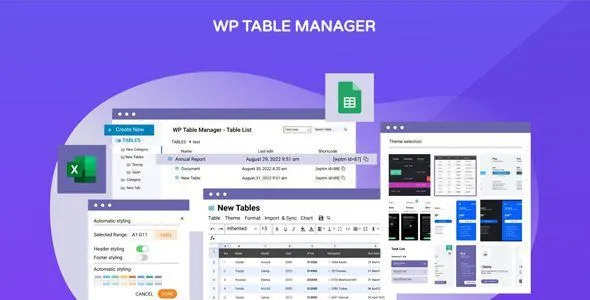
Pricing pages, comparison charts, event schedules, product catalogs — tables show up everywhere on WordPress sites. The problem? Building them usually means wrestling with HTML or begging a developer for help. WP Table Manager gives you a spreadsheet interface inside your WordPress dashboard. Create, edit, and style tables exactly how you want them — no code required.
What You Can Do With WP Table Manager
Your table data behaves like real data, not just formatted text. Sort columns with one click. Let visitors filter and search within any table. Pagination keeps long datasets readable. Need calculations? The editor supports formulas — sum a column, calculate percentages, or build pricing tables that update automatically. Already have data in Excel or Google Sheets? Import it in seconds. Export works both ways: CSV, XLSX, or ODS.
Design Control Without CSS Knowledge
Every visual element is customizable through the plugin settings. Choose from pre-built skins or create your own using a color picker, border controls, and typography options. Alternate row colors, header backgrounds, hover effects — these small details make tables scannable and look professional. On mobile devices, tables automatically collapse into readable stacked layouts. Your visitors won’t have to scroll sideways to see data.
Where to Display Your Tables
The plugin works with the WordPress block editor, Classic editor, and widget areas. Copy a shortcode, paste it where you need the table, and you’re done. One table can appear in multiple locations. You can even give each instance different pagination or sorting settings, so a single source table adapts to different page layouts.
Who Uses This WordPress Table Editor
Store owners build pricing comparisons and product feature charts. Course creators display syllabus schedules and grading rubrics. Event managers publish speaker lineups and session timetables. Nonprofits share impact statistics and donor lists. Anyone managing structured information on WordPress gets a dedicated tool — no spreadsheet software required, no developer tickets to file.
Quick Setup, Instant Results
Install the plugin, create your first table, publish it — takes minutes. The interface feels familiar if you’ve used Excel or Google Sheets. If you’ve ever fought with raw HTML table formatting in WordPress, you’ll notice the difference immediately. Commercial use is included — build tables for client sites without extra purchases.
- Spreadsheet-style editing with formula support for automatic calculations
- Import from Excel (.xlsx), CSV, ODS, or sync directly from Google Sheets
- Responsive design with mobile-friendly stacked layouts
- Sortable columns, searchable tables, and configurable pagination
- Pre-built themes plus manual styling with color and border controls
- Shortcodes work in posts, pages, widgets, and custom post types
Stop Struggling With WordPress Tables
No more wrestling with HTML table syntax or paying for third-party integrations. WP Table Manager handles data entry, styling, display, and mobile compatibility in one plugin. One purchase includes lifetime updates and support. Download it now.
Only logged in customers who have purchased this product may leave a review.
RELATED PRODUCTS

DIVI – Original License | One Time Payment – Exclusive Deal

Elementor Pro 4.1.3 + Elementorism Landing Pages WordPress Plugin

907 5.3.6 – Responsive Multi-Purpose WordPress Theme

Element Pack Pro 9.1.0 – Addon For Elementor

Lifetime Mini Membership





 Mobile Apps
 php script
 How to
Reviews
There are no reviews yet